Discover Local Events Near You: dtElection's Explore Feature
Most scheduling tools stop at polls. dtElection goes further — with the Explore feature, you can discover public events happening near you, from concerts and meetups to workshops and networking events.
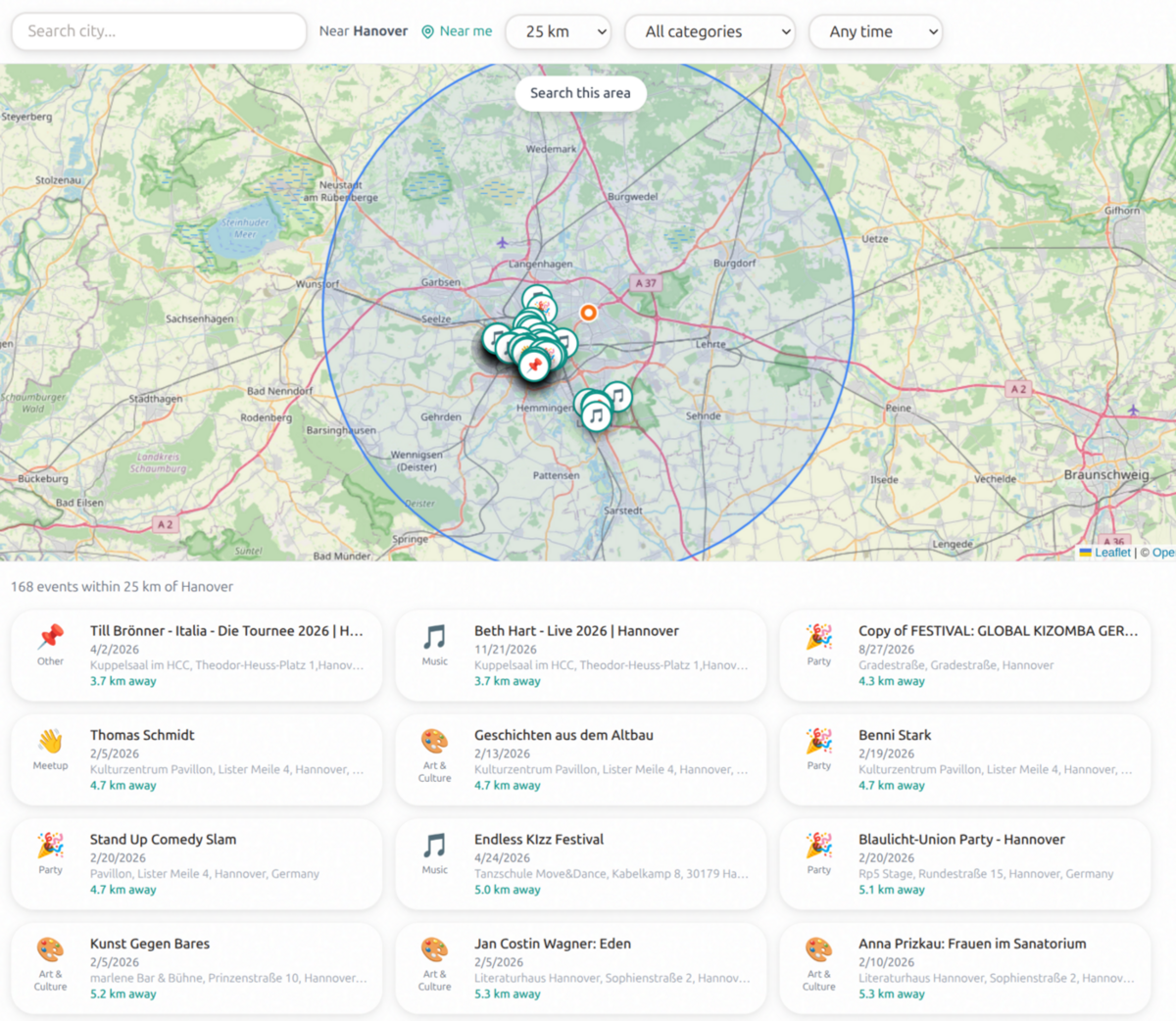
What Is Explore?
Explore is dtElection's event discovery feature. It shows you a map of public events in your area, filterable by category and date.
Unlike event platforms focused on ticket sales, Explore focuses on community events, meetups, and activities — the kind of things you'd want to coordinate with friends.
How It Works
1. Allow Location Access
When you visit the Explore page, dtElection asks for your location (you can also search for any city).
2. Browse Events on the Map
Events appear as pins on an OpenStreetMap. Click any pin to see event details.
3. Filter by Category
Looking for something specific? Filter by category:
- Music — Concerts, open mics, DJ nights
- Sports — Pickup games, races, watch parties
- Meetup — Community gatherings, social clubs
- Workshop — Classes, learning sessions
- Party — Celebrations, nightlife
- Food & Drink — Tastings, food festivals
- Networking — Professional events, mixers
- Outdoor — Hikes, outdoor activities
- Games — Board games, gaming events
- Art & Culture — Exhibitions, theater, cultural events
- Tech — Hackathons, tech talks, demos
4. Filter by Date
See events happening:
- Any time
- Today
- This week
- This month
5. View Event Details
Click an event to see:
- Full description
- Exact location with map
- Date and time
- RSVP option (for some events)
Why Explore?
It's Not Just About Selling Tickets
Platforms like Eventbrite and Ticketmaster focus on paid events because they make money from fees. Explore includes:
- Free community events
- Informal meetups
- Local activities without ticketing
Discovery + Scheduling Together
Found an interesting event? dtElection makes it easy to:
- See the event on Explore
- Share it with friends
- Create a poll to coordinate who's going
- RSVP together
Local Focus
We aggregate events from multiple sources to give you a comprehensive view of what's happening locally, including:
- Meetup groups
- Local venues
- Community organizations
- Event ticketing platforms
- Local event calendars
Using Explore with Friends
Here's how to use Explore for group planning:
Scenario: Weekend Plans
- Open Explore and filter to "This weekend"
- Browse events by category (Music, Food & Drink, Outdoor)
- Find a few interesting options
- Create a dtElection poll with those options
- Share with your friend group
- Vote on which event to attend
- Go together!
Scenario: Finding Networking Events
- Open Explore and filter to "Networking"
- See professional events in your area
- Check dates against your calendar
- RSVP or add to your own calendar
Scenario: Team Building Activity
- Filter Explore by "Workshop" or "Games"
- Find team-appropriate activities
- Create a poll for your team
- Let everyone vote on preferences
- Book the winning option
Events on Explore
Events come from various sources:
- User-created events — Anyone can create a public event on dtElection
- Aggregated listings — We pull from event APIs and local sources
- Community submissions — Users can submit events they discover
Event Categories Explained
| Category | What's Included |
|---|---|
| Music | Concerts, live bands, open mics, DJ sets, karaoke |
| Sports | Games, races, fitness classes, watch parties |
| Meetup | Social clubs, hobby groups, community gatherings |
| Workshop | Classes, tutorials, hands-on learning |
| Party | Celebrations, nightlife, themed events |
| Food & Drink | Tastings, festivals, pop-ups, food tours |
| Networking | Professional mixers, industry events, career fairs |
| Outdoor | Hikes, camping, outdoor adventures |
| Games | Board games, video games, trivia nights |
| Art & Culture | Museums, galleries, theater, cultural festivals |
| Tech | Hackathons, demos, tech talks, startup events |
Privacy on Explore
Explore maintains dtElection's privacy-first approach:
- Location is optional — You can search any city manually
- No tracking across events — We don't build profiles of your interests
- Anonymous browsing — No account required to explore events
- No advertising — Events aren't promoted based on payment
Creating Events for Explore
Want your event to appear on Explore? Here's how:
- Create a free dtElection account
- Click "New Event"
- Fill in event details (title, description, location, time)
- Set visibility to "Public"
- Your event appears on Explore
Tips for Event Creators
- Be specific with location — Use the map picker for accurate placement
- Choose the right category — Helps people find your event
- Write a clear description — What will attendees experience?
- Include the time — Obvious, but often forgotten
Explore vs. Other Event Platforms
| Feature | dtElection Explore | Eventbrite | Meetup | Facebook Events |
|---|---|---|---|---|
| Free events focus | Yes | Limited | Yes | Yes |
| No ads | Yes | No | No | No |
| No tracking | Yes | No | No | No |
| Ticketing | No | Yes | No | No |
| Map view | Yes | Limited | Yes | Limited |
| Category filters | Yes | Yes | Yes | Limited |
| Scheduling integration | Yes | No | Limited | No |
| Account to browse | No | No | No | Yes |
Coming Soon to Explore
We're actively improving Explore with:
- Saved searches — Get notified about new events matching your interests
- Friend activity — See what events friends are attending (opt-in)
- Event recommendations — Personalized suggestions based on past events
- Calendar sync — Add events directly to your calendar
Get Started with Explore
Ready to discover what's happening in your city?
- Visit dtelection.com/explore
- Allow location access (or search your city)
- Browse, filter, discover!
No account required to explore. Create a free account to save events and create polls. You can also browse all supported cities to find events in destinations around the world.
Ready to discover what's happening near you?
No account needed. Browse public events on the map — or create your own for free.
Open Explore